UX Designer Resume: Examples & Guide (2026)
Læs denne guide på danskA UX designer resume has one job the portfolio cannot do alone: prove that your design decisions were driven by research and that they moved a real metric. Recruiters scan for your tools, your process, and evidence that users, and the business, were better off.
This guide covers what hiring teams look for, how to structure each section, the skills and keywords that pass the ATS, and a full UX designer resume example you can adapt.
What hiring teams look for
- A portfolio link, front and center, that actually works.
- End-to-end process: research, ideation, prototyping, testing, iteration.
- Impact: conversion, task success, retention, or support tickets you moved.
- Collaboration with product, engineering, and research.
UX designer resume format and structure
Use a reverse-chronological format and put a working portfolio link in the top third, it is the first thing UX hiring teams check. Keep it to one page where you can. Section order:
- Header: name, title, location, email, and a prominent portfolio URL.
- Summary: your specialty (product, interaction, research) and biggest win.
- Skills: grouped into Design, Research, Prototyping, and Tools.
- Experience: each role with the problem, your process, and the outcome.
- Selected projects: 1–2 case studies with measurable results and links.
- Education and certifications last.
UX designer resume summary examples
Lead with your specialty, your tools, and a metric your design work moved. Three examples you can adapt, see more in our resume summary examples guide:
Product design: "Product designer with 6 years in B2B SaaS. Redesigned onboarding to cut drop-off 34% and built a design system adopted by 4 teams."
UX research-leaning: "UX designer who leads with research. Ran 40+ usability sessions that reshaped a healthcare product and raised task success 27%."
Entry-level: "Junior UX designer with a Google UX certificate and 3 portfolio case studies. Redesigned a checkout flow in a capstone that cut simulated drop-off 22%."
Skills and keywords to include
Mirror the posting where it honestly applies. A research-heavy role and a visual-design role screen for very different keywords.
- Tools: Figma, Sketch, Adobe XD, FigJam, Maze, Miro.
- Research: user interviews, usability testing, surveys, journey mapping, personas.
- Design: wireframing, prototyping, interaction design, information architecture, design systems.
- Practices: accessibility (WCAG), responsive design, A/B testing, Agile collaboration.
UX designer resume bullet examples
Every bullet should connect a design decision to research and a measurable outcome. Compare weak task-statements with strong, quantified versions:
Weak: "Redesigned the onboarding flow in Figma."
Strong: "Redesigned onboarding after 12 usability sessions, cutting drop-off 34% and lifting activation from 41% to 58%."
Weak: "Worked on the design system."
Strong: "Built a 60-component Figma design system adopted by 4 product teams, cutting design-to-dev handoff time roughly 40%."
Weak: "Made the product more accessible."
Strong: "Brought the core product to WCAG 2.1 AA, resolving 30+ accessibility issues and adding keyboard-first navigation."
Full UX designer resume example
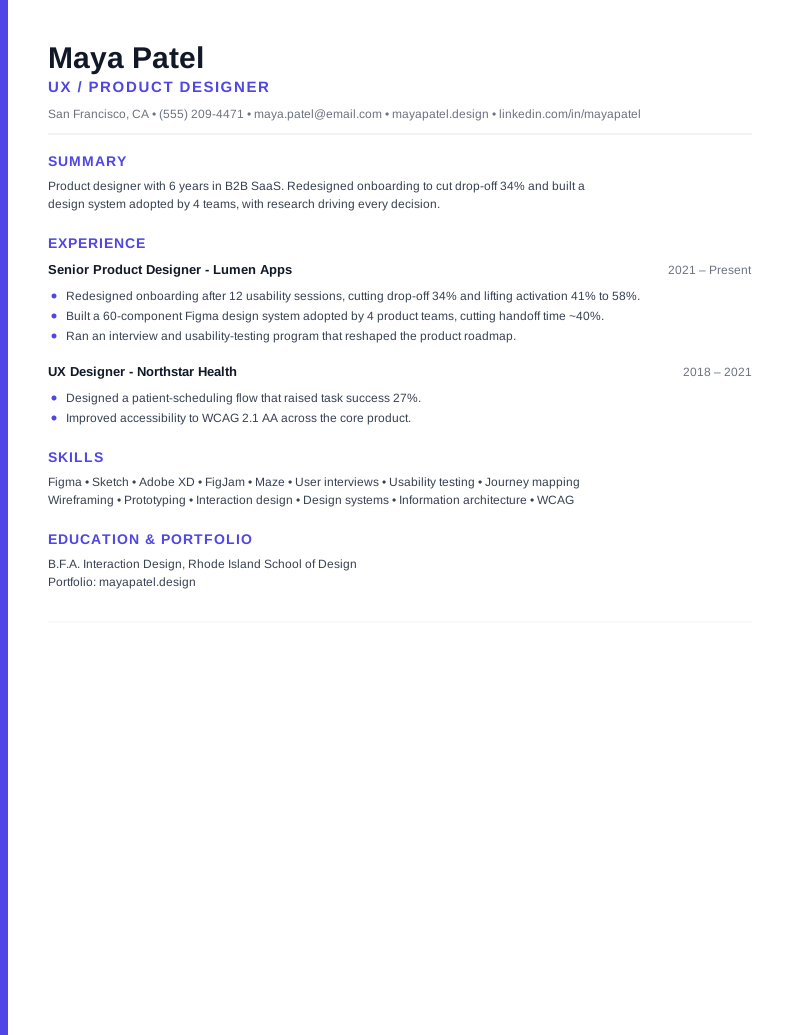
Maya Patel - UX / Product Designer | San Francisco, CA | (555) 209-4471 | maya.patel@email.com | mayapatel.design | linkedin.com/in/mayapatel
Summary: Product designer with 6 years in B2B SaaS. Redesigned onboarding to cut drop-off 34% and built a design system adopted by 4 teams, with research driving every decision.
Experience - Senior Product Designer, Lumen Apps (2021–Present): Lead design for the core SaaS product.
- Redesigned onboarding after 12 usability sessions, cutting drop-off 34% and lifting activation from 41% to 58%.
- Built a 60-component Figma design system adopted by 4 product teams, cutting handoff time roughly 40%.
- Ran an interview and usability-testing program that reshaped the product roadmap.
Experience - UX Designer, Northstar Health (2018–2021): Designed patient-facing scheduling and care flows.
- Designed a patient-scheduling flow that raised task success 27%.
- Improved accessibility to WCAG 2.1 AA across the core product.
Skills: Figma · Sketch · Adobe XD · FigJam · Maze · User interviews · Usability testing · Journey mapping · Wireframing · Prototyping · Design systems · WCAG
Education & Portfolio: B.F.A. Interaction Design, RISD · Portfolio: mayapatel.design
Common mistakes to avoid
- A missing, broken, or password-locked portfolio link.
- Listing tools with no evidence of the work or its outcome.
- Describing screens you made instead of problems you solved.
- No research signal, design with no "why" reads as decoration.
Quick checklist
- Working portfolio link in the top third of page one.
- Every key project shows process and a measurable outcome.
- Tools and research methods match the posting.
- Accessibility and collaboration signals present.
- One page for most designers; two only with deep experience.
Ready to build yours? Browse more resume examples, start from a free Applygrid resume template, keep it ATS-friendly, and pair it with a tailored letter from our AI cover letter generator.
Frequently asked questions
Do I need a portfolio for a UX designer resume?
Yes, a working portfolio link is the single most important thing on a UX resume. Put it in the header, make sure it is public (not password-locked), and feature 2–3 case studies that show your process and a measurable outcome.
What skills should a UX designer resume include?
Group them: tools (Figma, Sketch, Adobe XD), research (user interviews, usability testing, journey mapping), design (wireframing, prototyping, interaction design, design systems), and practices (accessibility/WCAG, responsive design, A/B testing). Mirror the posting, since research and visual-design roles screen for different terms.
How do I show impact on a UX resume?
Tie each design decision to research and a metric: drop-off reduced, task success or activation lifted, support tickets cut, or handoff time saved. For example, "redesigned onboarding after 12 usability sessions, cutting drop-off 34%."
How long should a UX designer resume be?
One page for most designers; two only with deep or senior experience. Keep the portfolio link and your strongest, most measurable project in the top third where they are seen first.
Applygrid builds the ATS-friendly resume builder and AI cover letter generator behind these guides. We write from hands-on experience with how applicant tracking systems parse resumes, what recruiters actually screen for, and what gets job seekers to the interview.
Put this into practice
Build an ATS-friendly resume and generate a tailored cover letter with Applygrid, free to start.