Administrative Assistant Resume: Examples & Guide (2026)
Læs denne guide på danskAn administrative assistant resume has to prove you keep things organized, accurate, and on schedule for the people who depend on you. Recruiters scan for the software you know, the scope you supported, and evidence you saved time or money, not just a list of office duties.
This guide covers what employers look for, how to structure each section, the skills and keywords that pass the ATS, and a full administrative assistant resume example you can adapt. Supporting senior leaders specifically? See the executive assistant resume guide; for front-desk roles, the receptionist resume guide.
What employers look for
- Software fluency: the office suite, calendar, and scheduling tools the role uses.
- Scope: who and how many people you supported, and the budgets you touched.
- Reliability: accuracy, deadlines met, and processes you kept running.
- Initiative: time saved, costs reduced, or systems you improved.
Administrative assistant resume format and structure
Use a clean, reverse-chronological format, an admin resume should itself look impeccably organized. Keep it to one page and quantify scope and savings. Section order:
- Header: name, location, email, and phone.
- Summary: years of experience, the function you supported, and a standout result.
- Experience: each role with scope, tools, and a quantified outcome.
- Skills: office software, scheduling, and any specialized systems.
- Education and certifications (e.g. Microsoft Office Specialist) last.
Administrative assistant resume summary examples
Lead with who you supported, your tools, and a time- or cost-saving result. Three examples you can adapt, see more in our resume summary examples guide:
Executive support: "Administrative assistant with 6 years supporting executives. Coordinated 200+ meetings a month with zero double-bookings and cut office supply spend 18%."
Office coordination: "Detail-oriented office administrator skilled in Microsoft Office and Concur. Processed expenses for a 25-person team at 100% policy compliance and ran events for up to 120 attendees."
Entry-level: "Organized administrative professional with strong Microsoft Office and Google Workspace skills. Reduced scheduling conflicts 30% by building a shared team calendar during an internship."
Skills and keywords to include
Mirror the keywords from the job posting so your resume passes the ATS. The terms recruiters and screening software look for most:
- Software: Microsoft Office (Word, Excel, Outlook, PowerPoint), Google Workspace.
- Tools: calendar management, travel booking, expense reporting, QuickBooks, Concur.
- Functions: scheduling, correspondence, data entry, file management, event coordination.
- Strengths employers screen for: attention to detail, prioritization, confidentiality.
Administrative assistant resume bullet examples
Every bullet should show scope (people, meetings, budgets) and a result. Compare weak duty-statements with strong, quantified versions:
Weak: "Responsible for scheduling and office tasks."
Strong: "Managed calendars and travel for 4 executives, coordinating 200+ meetings a month with zero double-bookings."
Weak: "Helped the office save money on supplies."
Strong: "Renegotiated vendor contracts and streamlined ordering, cutting office supply spend 18% ($14K) a year."
Weak: "Did expense reports for the team."
Strong: "Processed expense reports in Concur for a 25-person team with 100% policy compliance."
Full administrative assistant resume example
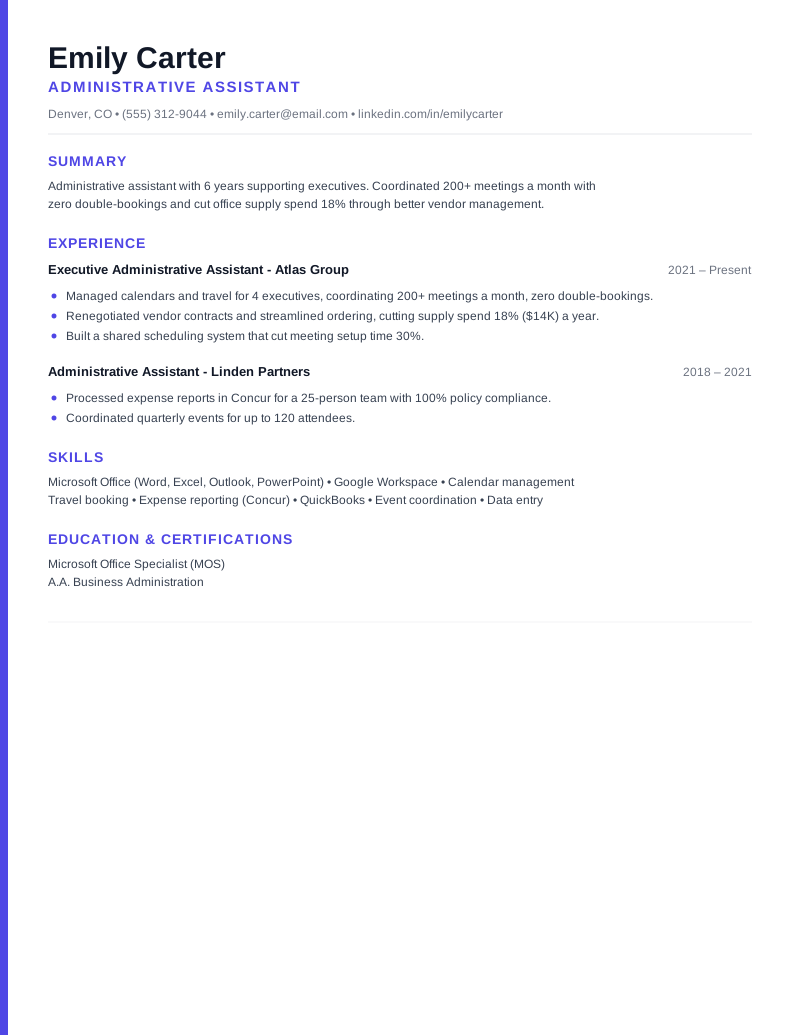
Emily Carter - Administrative Assistant | Denver, CO | (555) 312-9044 | emily.carter@email.com | linkedin.com/in/emilycarter
Summary: Administrative assistant with 6 years supporting executives. Coordinated 200+ meetings a month with zero double-bookings and cut office supply spend 18% through better vendor management.
Experience - Executive Administrative Assistant, Atlas Group (2021–Present): Support a 4-person executive team and office operations.
- Managed calendars and travel for 4 executives, coordinating 200+ meetings a month with zero double-bookings.
- Renegotiated vendor contracts and streamlined ordering, cutting office supply spend 18% ($14K) a year.
- Built a shared scheduling system that cut meeting setup time 30%.
Experience - Administrative Assistant, Linden Partners (2018–2021): Supported a 25-person team with scheduling, expenses, and events.
- Processed expense reports in Concur for a 25-person team with 100% policy compliance.
- Coordinated quarterly events for up to 120 attendees.
Skills: Microsoft Office (Word, Excel, Outlook, PowerPoint) · Google Workspace · Calendar management · Travel booking · Expense reporting (Concur) · QuickBooks · Event coordination
Education & Certifications: Microsoft Office Specialist (MOS) · A.A. Business Administration
Common mistakes to avoid
- Listing generic office duties with no scope or numbers.
- No evidence of time saved, accuracy, or improvements made.
- Omitting the specific software the posting requires.
- A cluttered layout, admin resumes should look impeccably organized.
Quick checklist
- Software and the function you supported visible early.
- Bullets show scope (people, meetings, budgets) and outcomes.
- Keywords match the posting (tools and responsibilities).
- Quantified time or cost savings where you have them.
- Clean, single-column, ATS-readable layout.
Ready to build yours? Browse more resume examples, start from a free Applygrid resume template, keep it ATS-friendly, and pair it with a tailored letter from our AI cover letter generator.
Frequently asked questions
What skills should an administrative assistant resume include?
Lead with office software (Microsoft Office: Word, Excel, Outlook, PowerPoint, and Google Workspace), then tools (calendar management, travel booking, expense systems like Concur, QuickBooks) and functions (scheduling, correspondence, data entry, event coordination). Mirror the posting’s exact terms.
How do I quantify an administrative assistant resume?
Show scope and savings: how many executives or people you supported, meetings or events coordinated, error or conflict rates, and time or money saved. For example, "coordinated 200+ meetings a month with zero double-bookings."
What should an administrative assistant resume summary say?
In two or three lines, state your years of experience, who or what you supported, and a standout result, for example, cutting scheduling conflicts or office costs. Lead with impact rather than a list of duties.
How long should an administrative assistant resume be?
One page for nearly everyone in this field. Keep the layout clean and single-column so it parses cleanly and signals the organization the role requires.
Applygrid builds the ATS-friendly resume builder and AI cover letter generator behind these guides. We write from hands-on experience with how applicant tracking systems parse resumes, what recruiters actually screen for, and what gets job seekers to the interview.
Put this into practice
Build an ATS-friendly resume and generate a tailored cover letter with Applygrid, free to start.